Sheetify CRM
Sheetify Projects | 9-in-1 Google Sheets Project Management Template
Couldn't load pickup availability
Everything You Need to Manage Projects, Inside Google Sheets
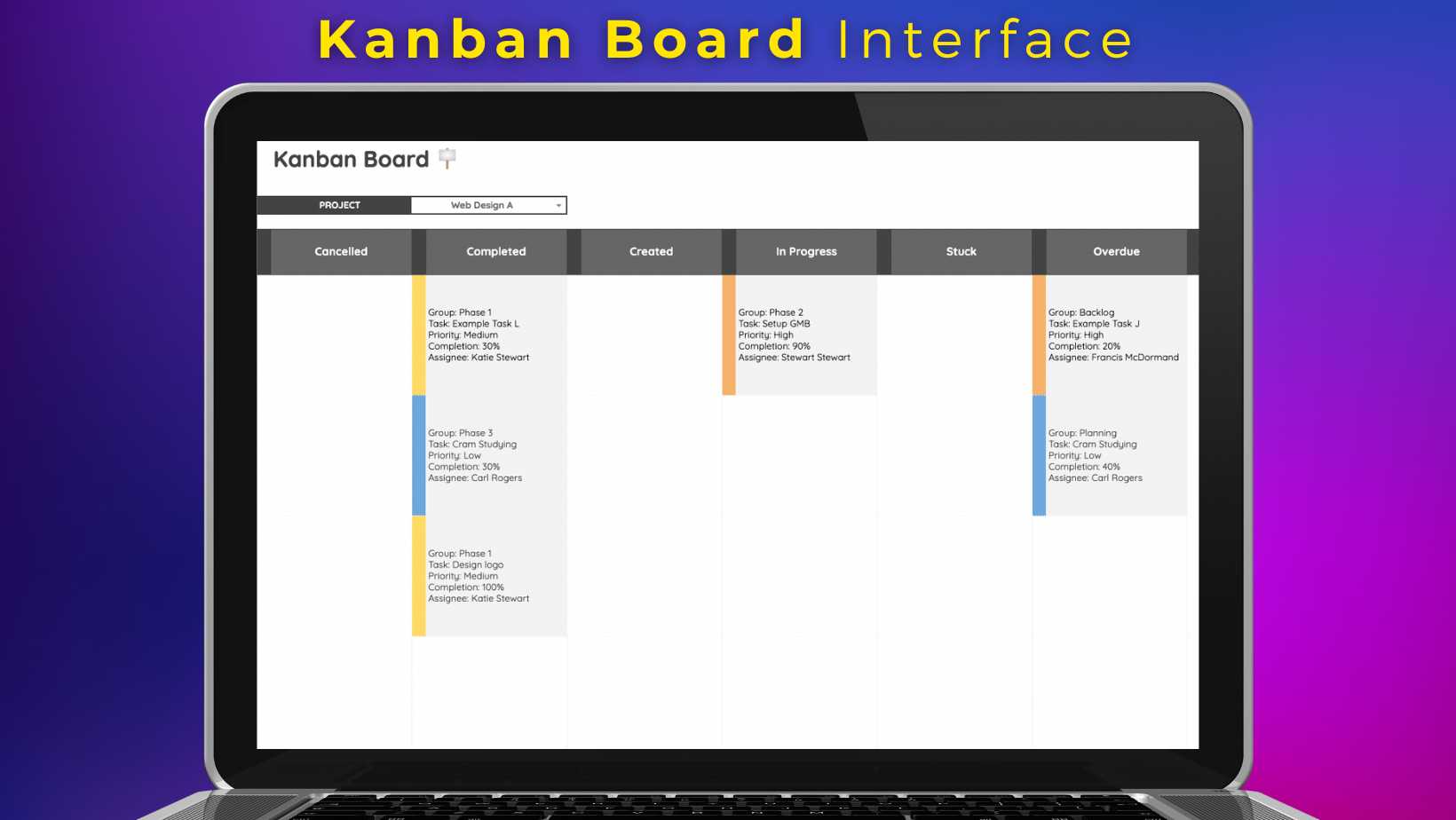
Sheetify Projects builds on the familiarity of Google Sheets to give you a full feature project management system. This is more than just a Google Sheets project management template. We built this toolkit with Apps Script to give you powerful PM tools. This includes; project and task tracking, Gantt, Calendar and Kanban view types, team email notifications, automated reporting, and more, all inside a custom built and dynamic project management spreadsheet.
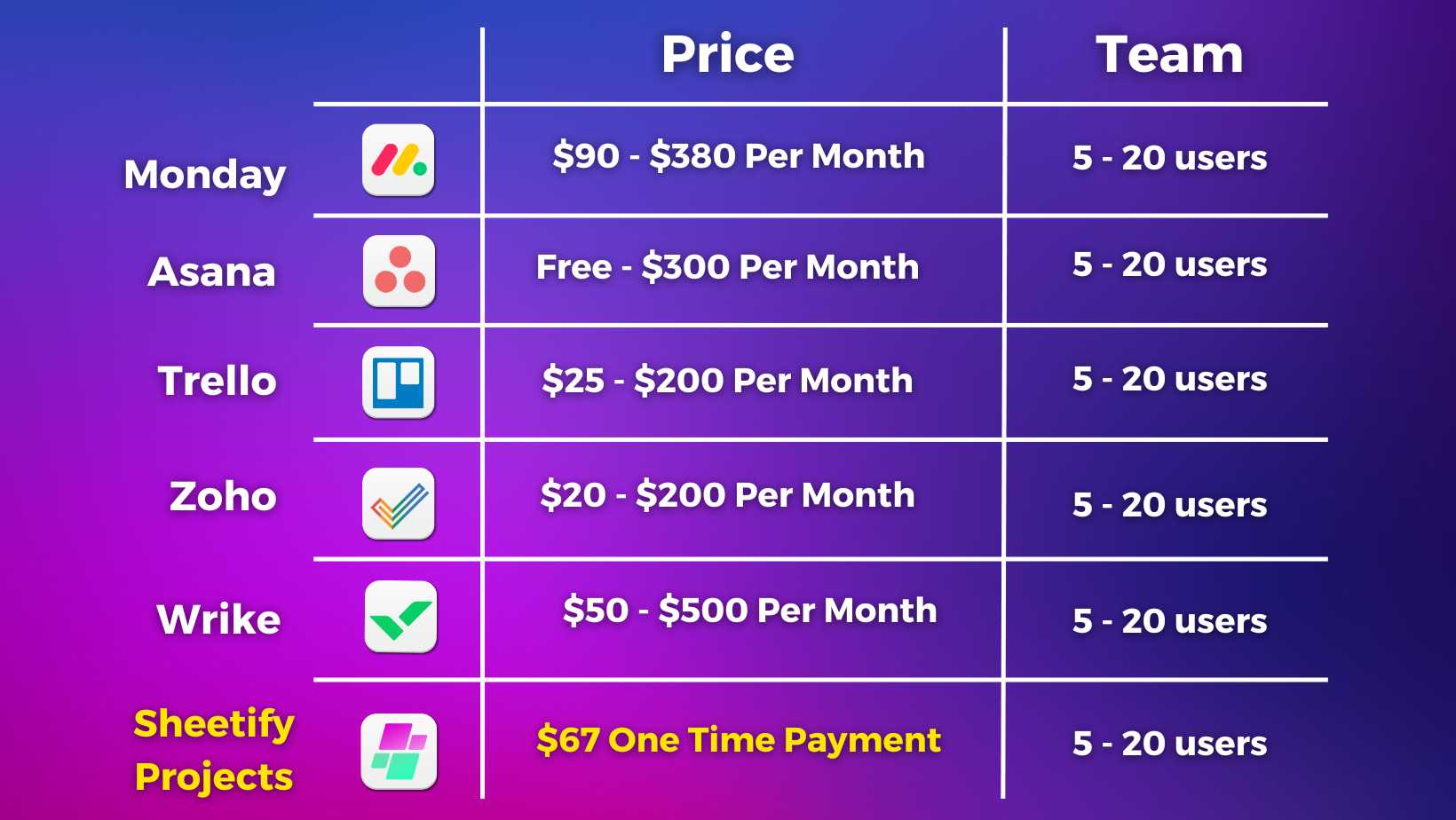
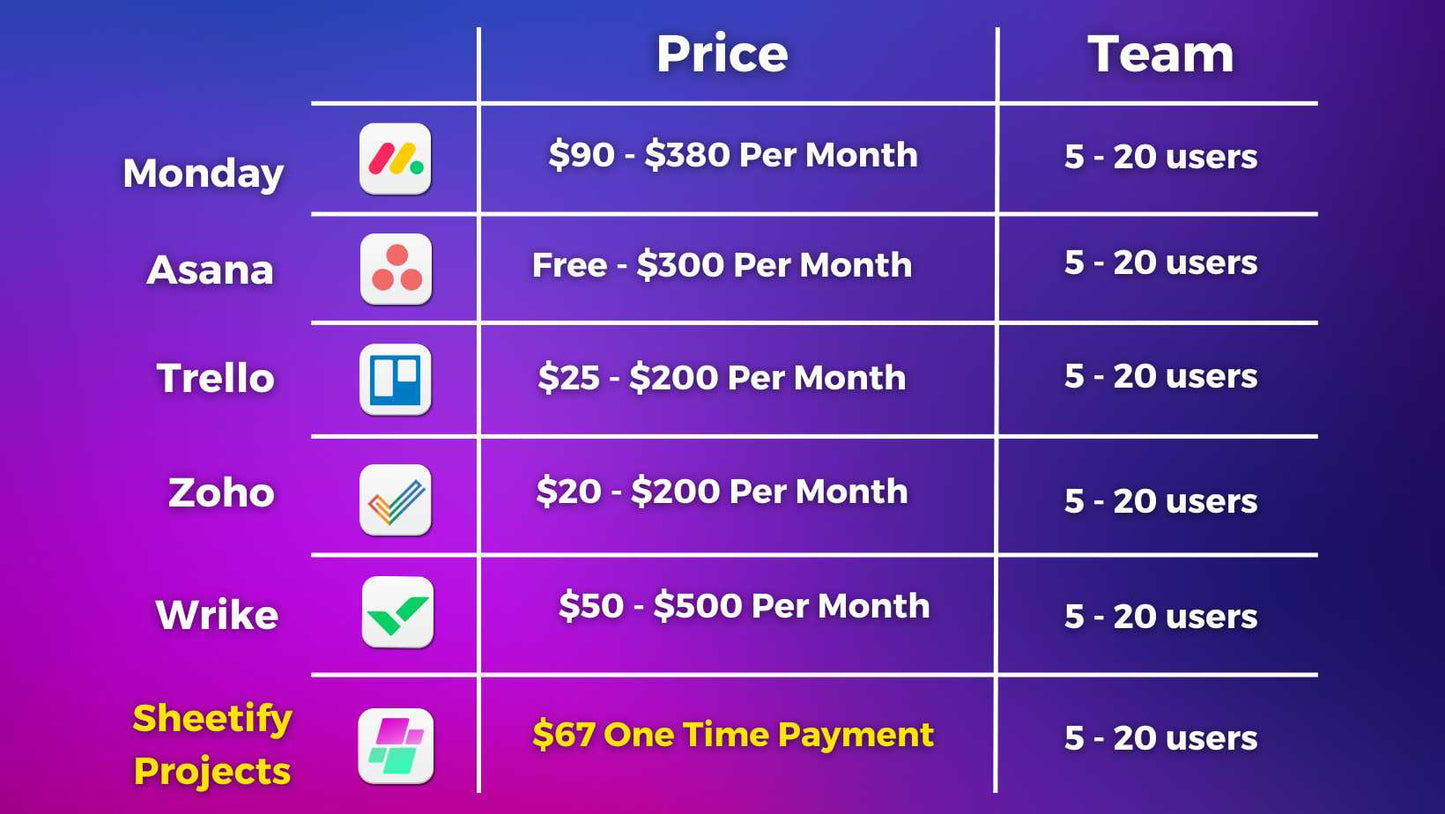
Most project management platforms charge per user, per month. For a small growing team, that adds up fast, and before long, you are paying for features you do not need. Sheetify Projects is a one-time payment of $57 for your whole team, with lifetime access and lifetime updates included. No per-seat costs, no subscription renewals, no price increases as your team grows.
Basic project management Google Sheets templates fall short when you need proper project visibility, team coordination, and progress tracking. Dedicated software like Asana or Monday.com gives you those tools but locks you into expensive monthly plans. Sheetify Projects sits in the middle, giving you everything a small business, project managing team actually needs, integrated with your favorite Google Apps, ready use for managing your projects and tasks.
Collaborate with up to 100 users and manage unlimited projects and tasks, without paying more as your team grows.
If your also looking to optimize the way you manage your customer relationship activities, our Google Sheets CRM template works alongside Sheetify Projects with the same one-time payment and popular Google apps integrations.
Share

20% OFF DOUBLE COMBO
On Sheetify Projects + CRM (automatic discount after adding both products to your cart)
Fantastic project management system!
I’m impressed with how much power is packed into a Google Sheets template. From timelines to task automation and team emails, it has become my go-to tool. Super happy with my purchase!
Hey Jim, thank you for taking the time to leave a review on each toolkit you purchased!
I am learning how to use this great tool
Thanks Ron for the review!
I found this to be a great all-in-one platform to help keep my project on track, provide the necessary information to the team and pull any critical pieces in focus.
Very quick to respond to questions / inquiries, online videos to help with making this a great fit for yourself, your team and your project.
Hey Clarence,
Thanks for reviewing Sheetify Projects. All the best with your projects!
i've purchased it along with the crm, connecting both to process data is also possible, thanks for building this tool
You're welcome. Thank for the review. Reach out if you have any questions.
Like all of the Sheetify products it is a simple easy to use system with a logical flow and clean design.
We appreciate the review. Thank you.
Is Sheetify Projects Management Right for You?
Sheetify Projects is built for small business owners, freelancers, and solo operators who want a proper Google Apps management system without the cost and complexity of traditional software.
It works entirely inside Google Sheets, so there's no new platform to learn, no data to migrate to an unfamiliar system, and no subscription eating into your margins every month. Sheetify Projects gives you everything you need in a format you already understand.
Watch our video to see exactly what's inside and decide for yourself.
-
🛠️ Sheetify Projects Features and Tools 🛠️
Sheetify Projects replaces the tools most small business teams are paying for separately. Here's everything included in a single one-time purchase.
-
Features
- ✅ Send Personalized Team Emails:
Email your team or clients directly from inside Sheetify Projects via Gmail, without switching between tools. - ✅ Enable Team Email Notifications:
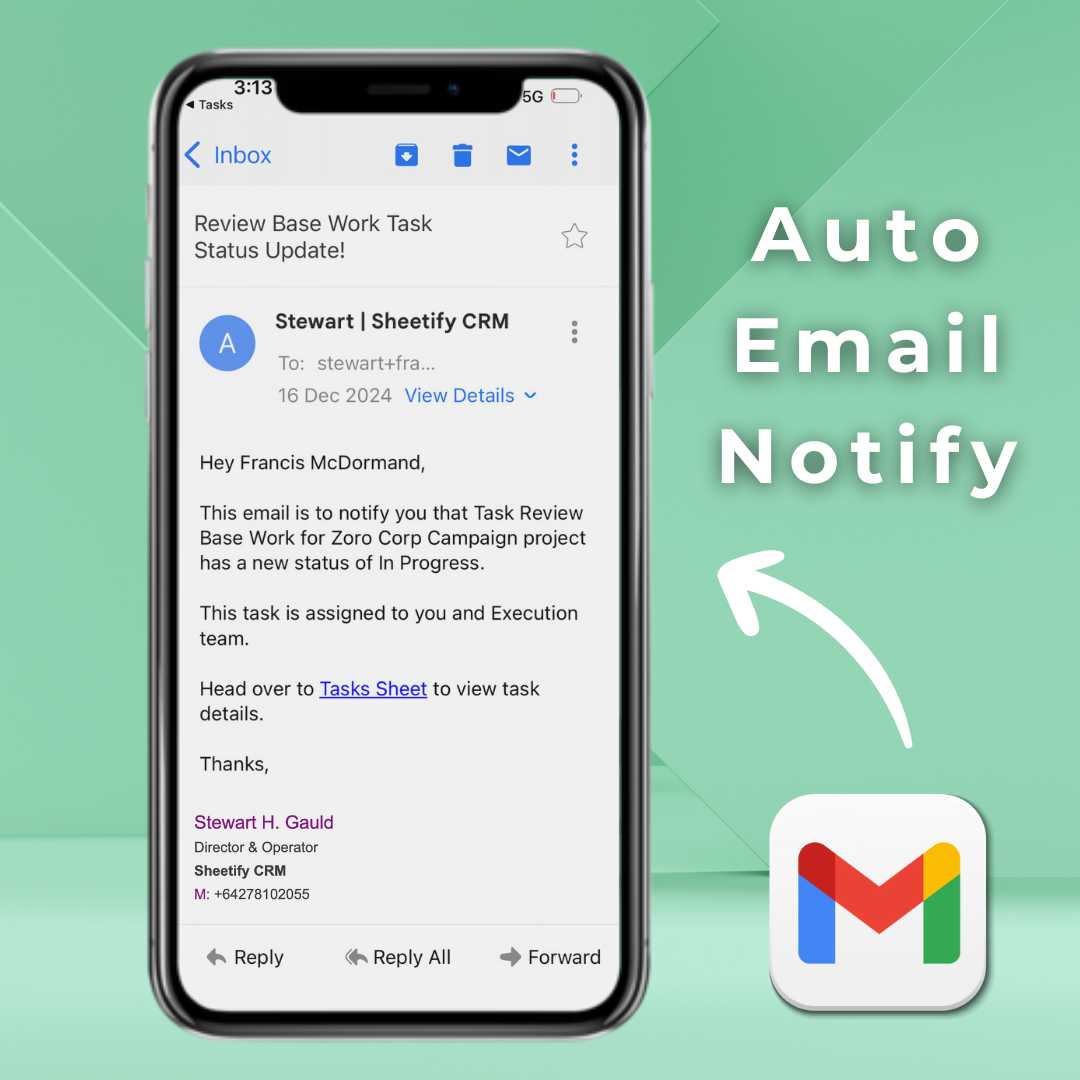
Set up automatic email alerts for status changes, overdue tasks, and over-budget items so your team stays informed without manual check-ins. - ✅ Record Team Interactions:
Log meetings, calls, and key communications against each project so the full history is always in one place. - ✅ Add New Projects via Google Forms: Connect a Google Form to Sheetify Projects and have new project requests flow in automatically.
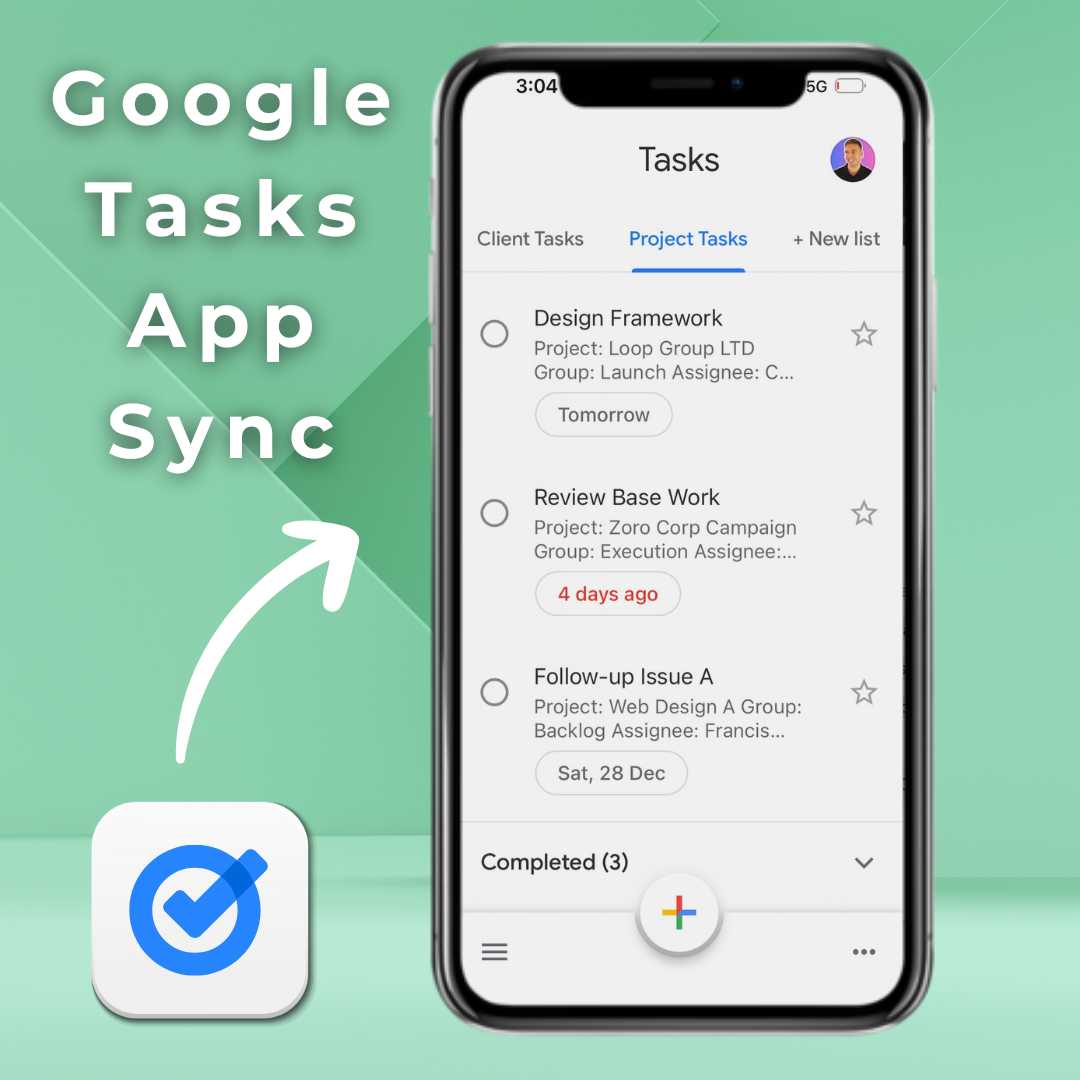
- ✅ Sync Tasks with Google Tasks:
Push tasks directly to the Google Tasks app so your team can manage and update them on desktop and mobile. - ✅ Personalize Email Templates:
Use one of the built-in email templates or build your own to keep team and client communications consistent. - ✅ Send Reports (Dashboard Snapshot): Schedule and send automated weekly reports or real-time project snapshots directly to your email.
- ✅ Send Personalized Team Emails:
-
Tools
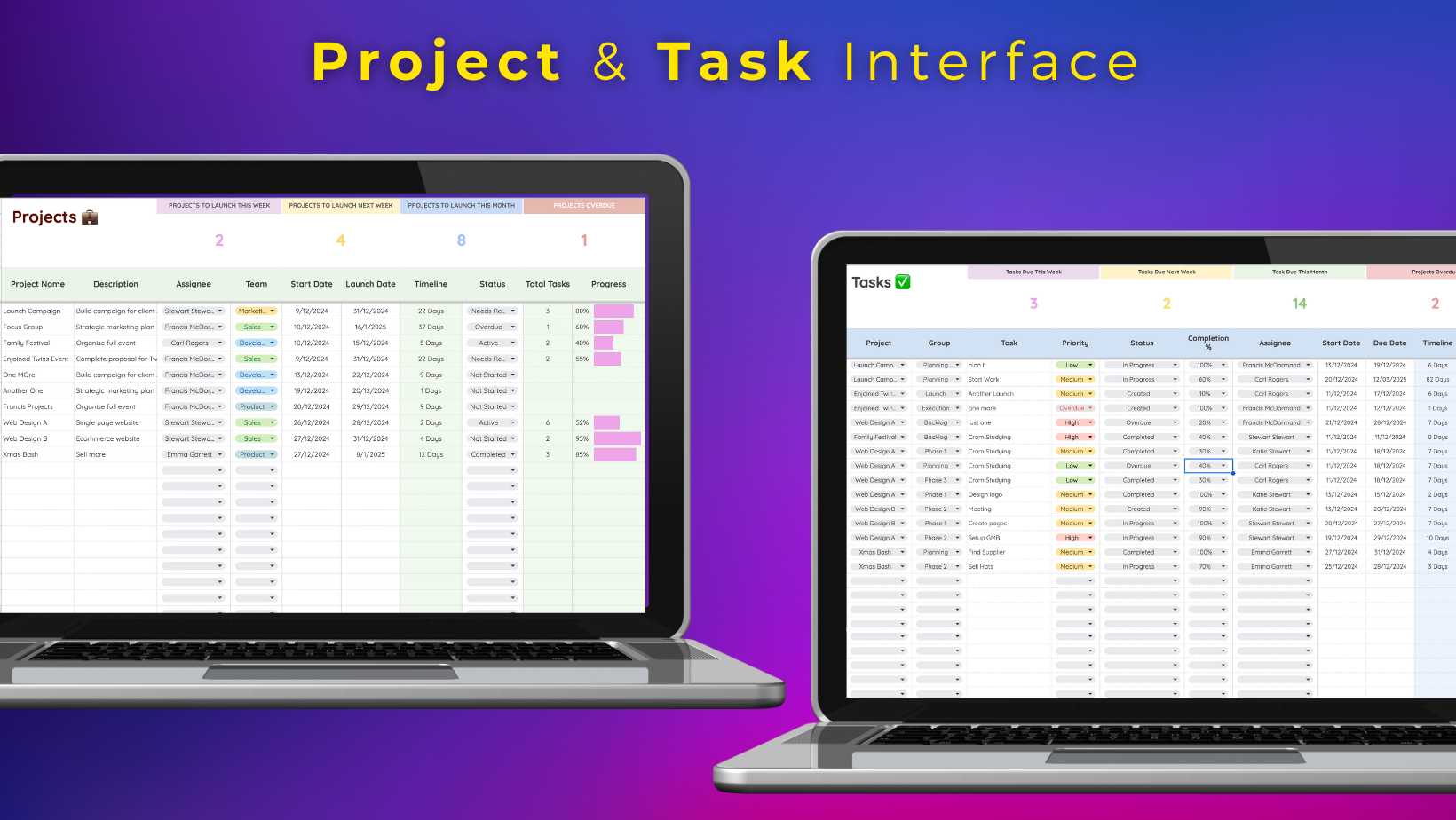
- ✅ Add Unlimited Projects: Manage as many active projects as your business needs, all organized within a single Google Sheets template.
- ✅ Add Unlimited Tasks:
Break every project down into individual tasks, assign owners, set deadlines, and track progress without any restrictions. - ✅ Progress Tracker: See exactly where each project sits within the project lifecycle at a glance, so nothing falls behind without you knowing.
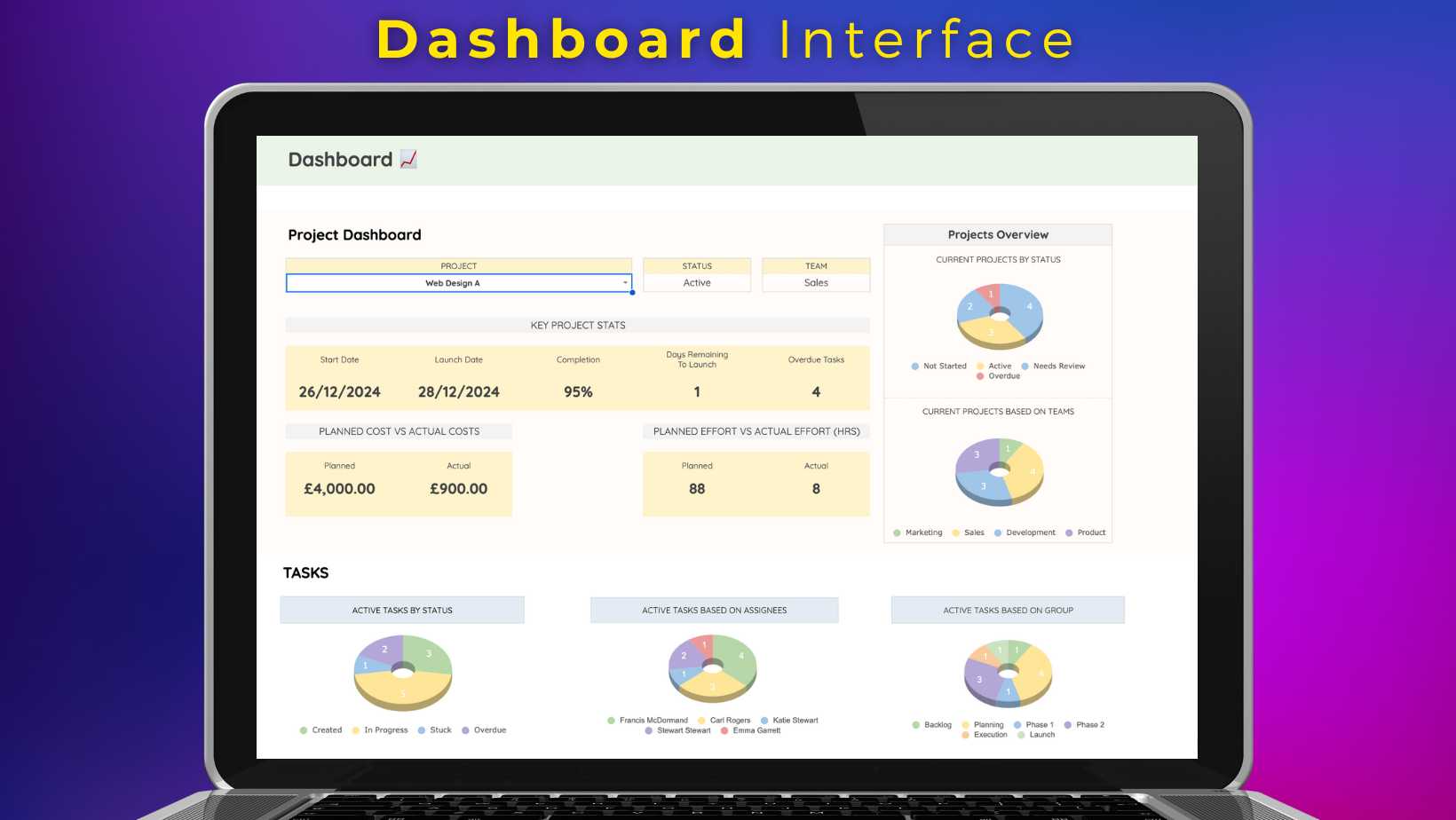
- ✅ Planned Cost and Effort vs Actual: Compare your original budget and time estimates against real figures to identify where projects are running over and why.
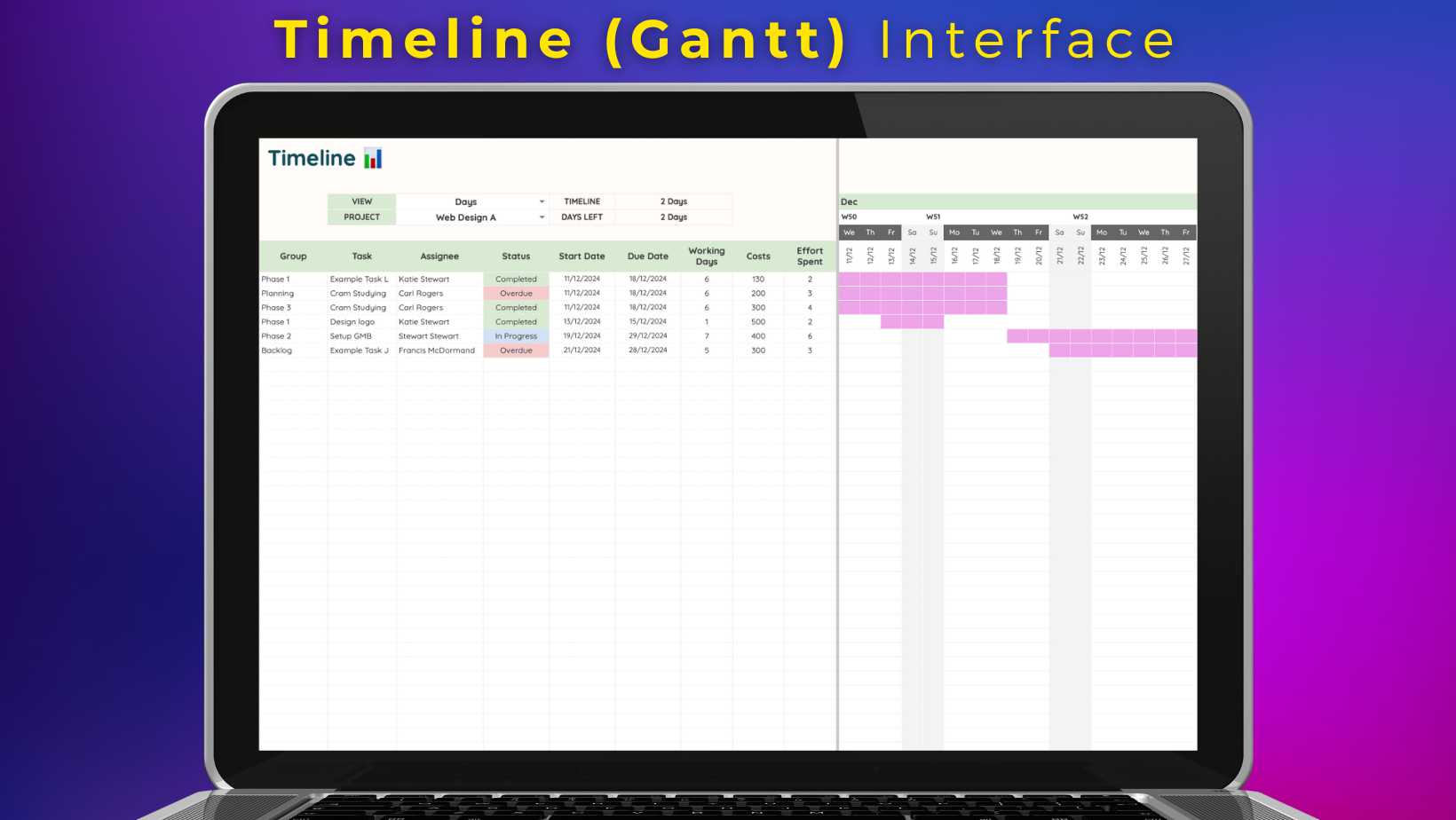
- ✅ Timeline (Gantt) and Kanban Views:
Visualize your projects and deadlines in the format that works best for you, whether that is a timeline, a Gantt chart, or a Kanban board. - ✅ Dashboard Analytics:
Get a bird's-eye view of all active projects in one place, with key metrics updated automatically as your team works. - ✅ Unlimited Team Collaboration:
Invite your whole team to view and edit in real time, with no user limits and no additional cost per person.
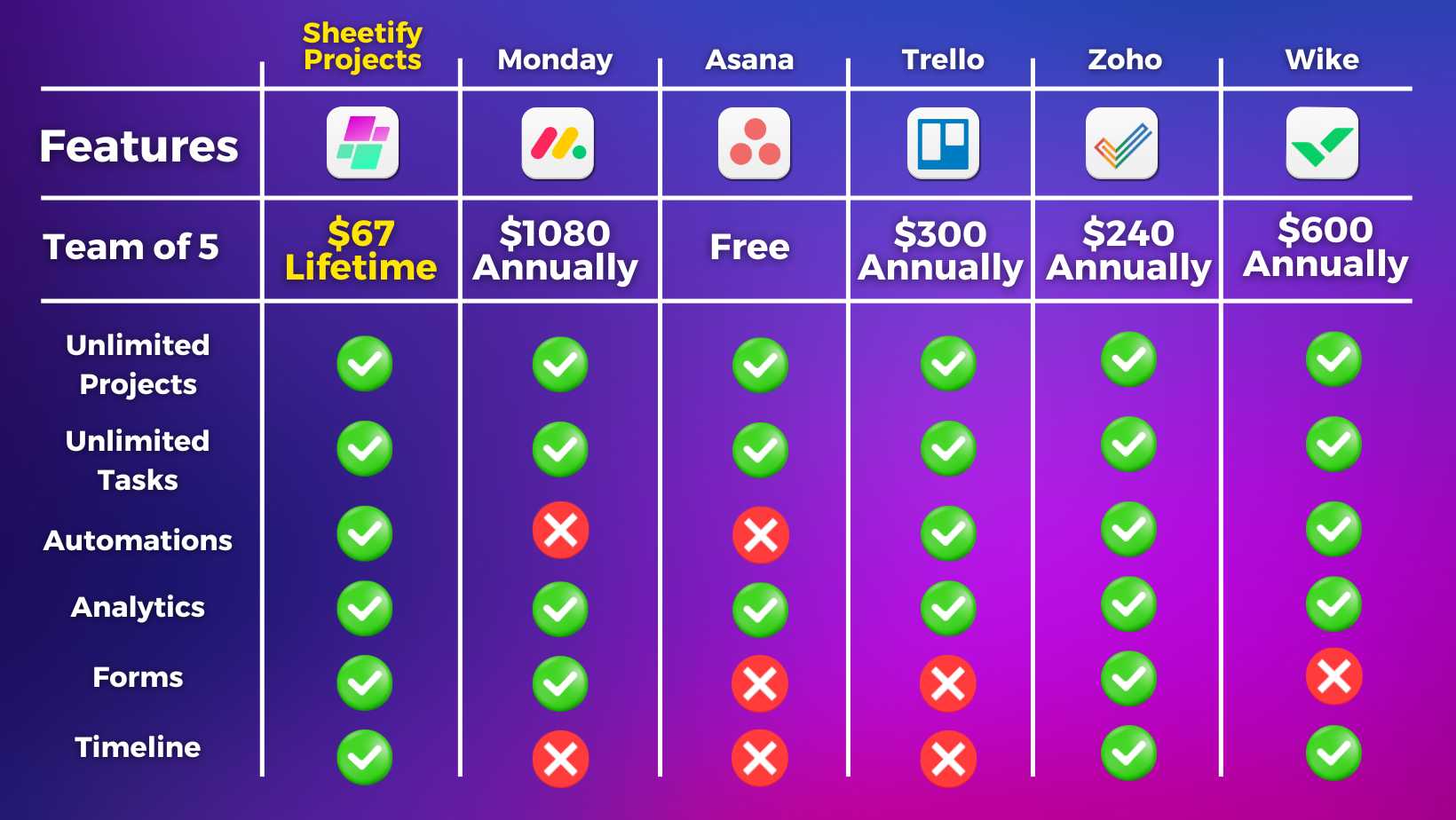
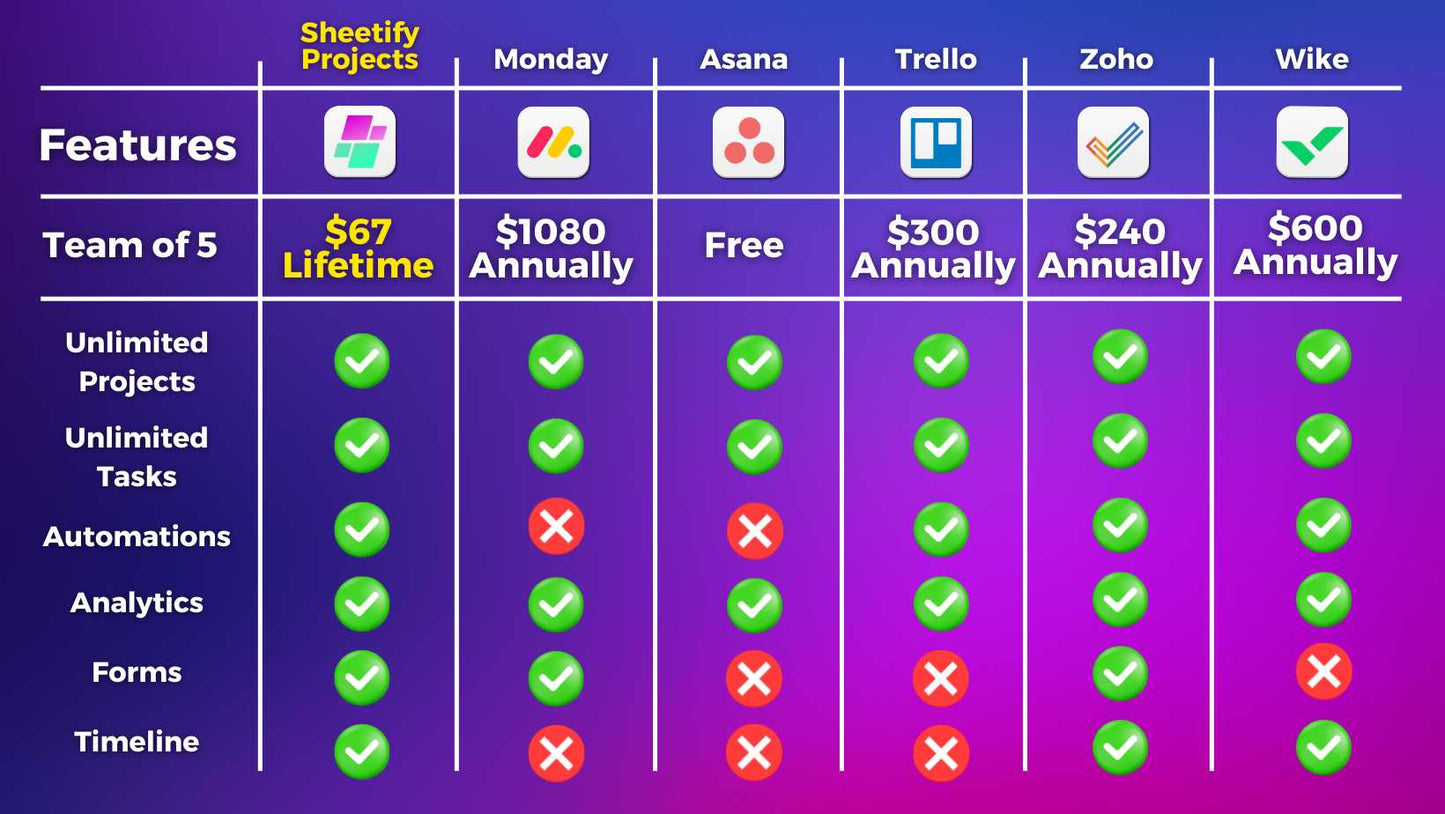
Full Features, One Price. See How Sheetify Projects Compares
A Closer Look at What's Inside
Google Tasks App Integration
Sheetify Projects integrates directly with the Google Tasks app, meaning you can manage your project tasks and recurring tasks inside Sheetify and in the Google Tasks mobile or desktop app. Stay on top of your workload wherever you are.
Email Marketing & Broadcast Templates
Sheetify Projects connects with your Gmail account, allowing you to send personalized emails to your team directly from inside the template. You can also set up automated email notifications so that when a task status changes, an update is sent automatically to the assignee. No manual follow-up needed.
One Payment. Lifetime access. No Subscriptions, Ever.
Most project management platforms lock you into a monthly plan from day one. Sheetify Projects works differently. You pay once and own it outright, with lifetime access and every future update included.
No renewal on-going fees, no price increases, no per-seat costs as your team grows. The same one-time pricing applies across the all Sheetify tools.
If you also need to track your business finances, our Google Sheets bookkeeping template covers income, expenses, invoices, and reporting without a subscription in sight. Most project management platforms lock you into a monthly plan from day one. Sheetify Projects works differently.
You pay once and own it outright, with lifetime access and every future update included. No renewal reminders, no price increases, no per-seat costs as your team grows. The same one-time pricing applies across the full Sheetify eco-system.
If you also need to track your business finances, our Google Sheets bookkeeping template covers income, expenses, invoices, and reporting without a subscription in sight.
-
🟢 Feature-Packed Google Sheets Project Management
Our most affordable functional project management template for small and micro businesses. Simply manage and stay on top of all your active projects and tasks.
-
🟢 No Subscriptions or Fees
Most project management platforms lock you into expensive monthly subscription plans that increase based on features and users. Sheetify Projects is a one-time payment and gives you access to all features with lifetime updates.
-
🟢 Lifetime Access
You get access to lifetime updates with Sheetify Projects. The great thing is, it is super easy to migrate your data from your existing Sheetify Google Sheets project management template to a more recent update.
-
🟢 Easy-to-use
Built on Google Sheets, a tool that many small business owners already know and love. Using Sheetify Projects is straightforward for anyone, even if you have never used Google Sheets before.
Sheetify Projects is designed to be set up fast. There is no software to install, no developer needed, and no complicated onboarding process. Just three simple steps, and you are ready to start managing your projects.
Up and Running in Under 10 Minutes
Step 1: Copy the Template
Purchase and then copy the Google Sheets project management template directly to your own Google Drive to make it yours.
Inside the template click File > Create a copy > Choose a folder in your Drive > Copy > Authorize.
Step 2: Authorize Sheetify Projects
Click on 'Sheetify' then 'Set UpSheetify' and 'Set authorization', a simple 3-click process that connectsSheetifyProjects to your Google account.
Step 3: Personalize Your Account
Click on the 'Settings' sheet and set up your account, add your business details, configure your project settings, and you are ready to go.
See Sheetify Projects in Action
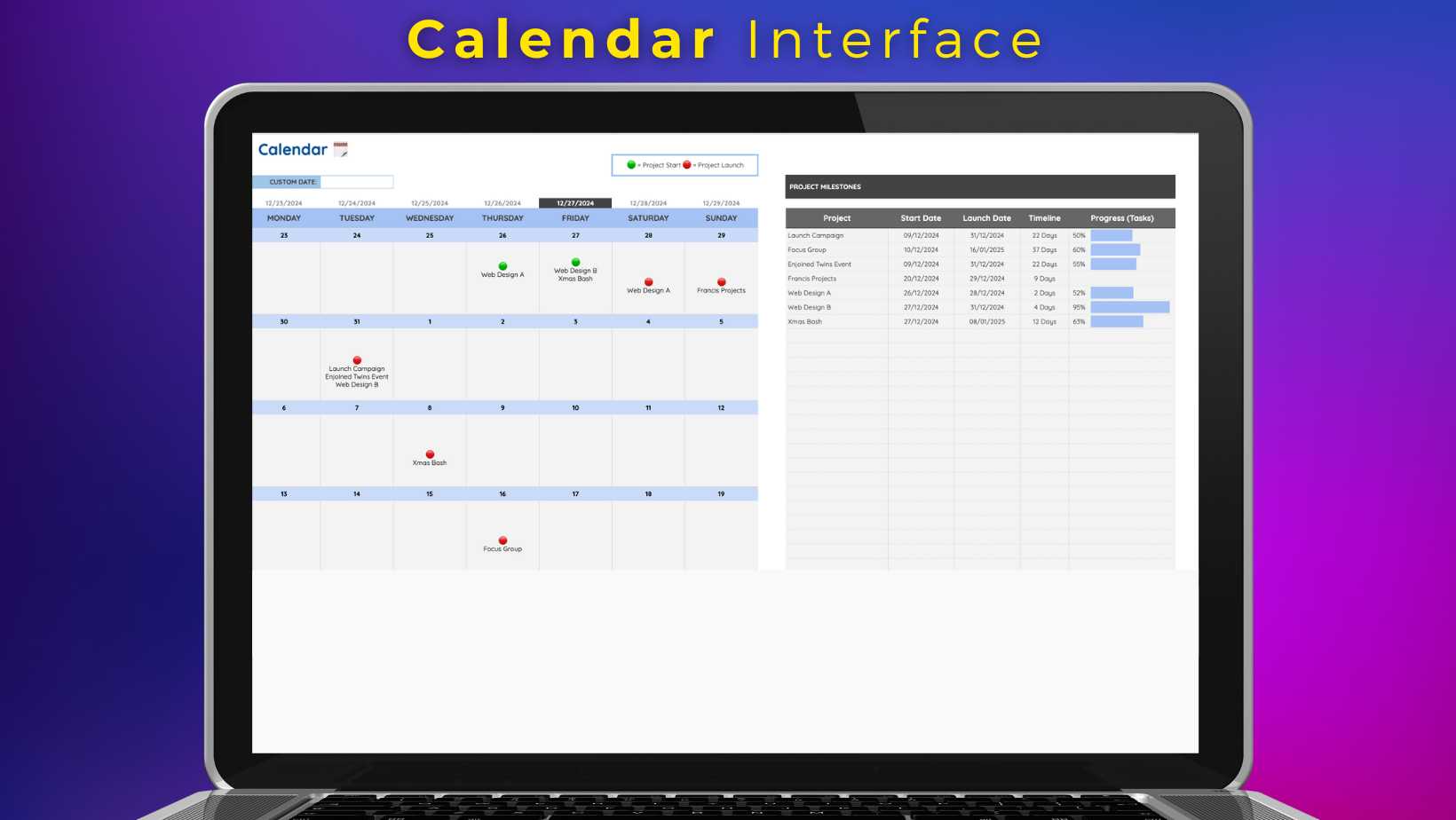
Not sure how it all fits together? Our full tutorial walks you through every feature, from setting up your first project and assigning tasks to visualizing deadlines in Gantt, Kanban, and Calendar views. Everything you need to get up and running, in one video.
Whether you are brand new to project management software or just want to see how Sheetify Projects works before you buy, this is the best place to start. No technical knowledge required. If you can use a spreadsheet, you can use Sheetify Projects.
Everything You Need to Manage Your Projects, Inside Google Sheets
One payment, lifetime access, no subscriptions. Join small business owners and teams already using Sheetify Projects to manage their work without the monthly bill.
Frequently Asked Questions
How much does Sheetify Projects cost?
Currently only $57USD! This gives you lifetime updates to new versions with even more features.
We have three separate products:
- Sheetify CRM ($67)
- Sheetify Bookkeeping ($57)
- Sheetify Projects ($57)
Is it just a Google Sheets template?
It's more than just a Google Sheets template...
We have built an integrated project management platform using Google Sheets that seamlessly integrates with your favorite Google Apps.
What type of business is Sheetify CRM suitable for?
Sheetify Projects is suitable for...
✅ Consultancies
✅ Tradesmen
✅ Small Agencies
✅ Sole Proprietor (Individuals)
✅ Home-based Businesses
✅ Marketers
✅ Service-based Businesses
✅ Ecommerce Businesses
✅ Real Estate Agents
✅ Contractors
✅ And many more!
This Google Sheets Projects template is built for Google users (free and paid).
What Google Apps does it work with?
Google App Integrations:
✅ Gmail Integration (Send reports and updates)
✅ Google Forms (for new projects)
✅ Google Tasks (for project tasks)
Which languages is Sheetify Projects available in?
Sheetify Projects is built with Google Sheets meaning that you have access to all the languages that Google Sheets offer!
However, at the moment, Sheetify Projects is only in English.